System Information
This page provides an overview of the interworking of the Napoleon eFIRE Bluetooth Controller with the SIT ProFlame 2 Integrated Fireplace Controller.
Napoleon eFIRE Bluetooth Controller

The Napoleon W190-0090 Bluetooth Controller is based on an Iton Technology BT4GMD-Q25P Bluetooth module. This Bluetooth module utilizes a Cypress Semiconductor CYW20736A1KML2G Bluetooth LE SoC.
Refer to the module’s FCC filing for some additional details.
Connectors
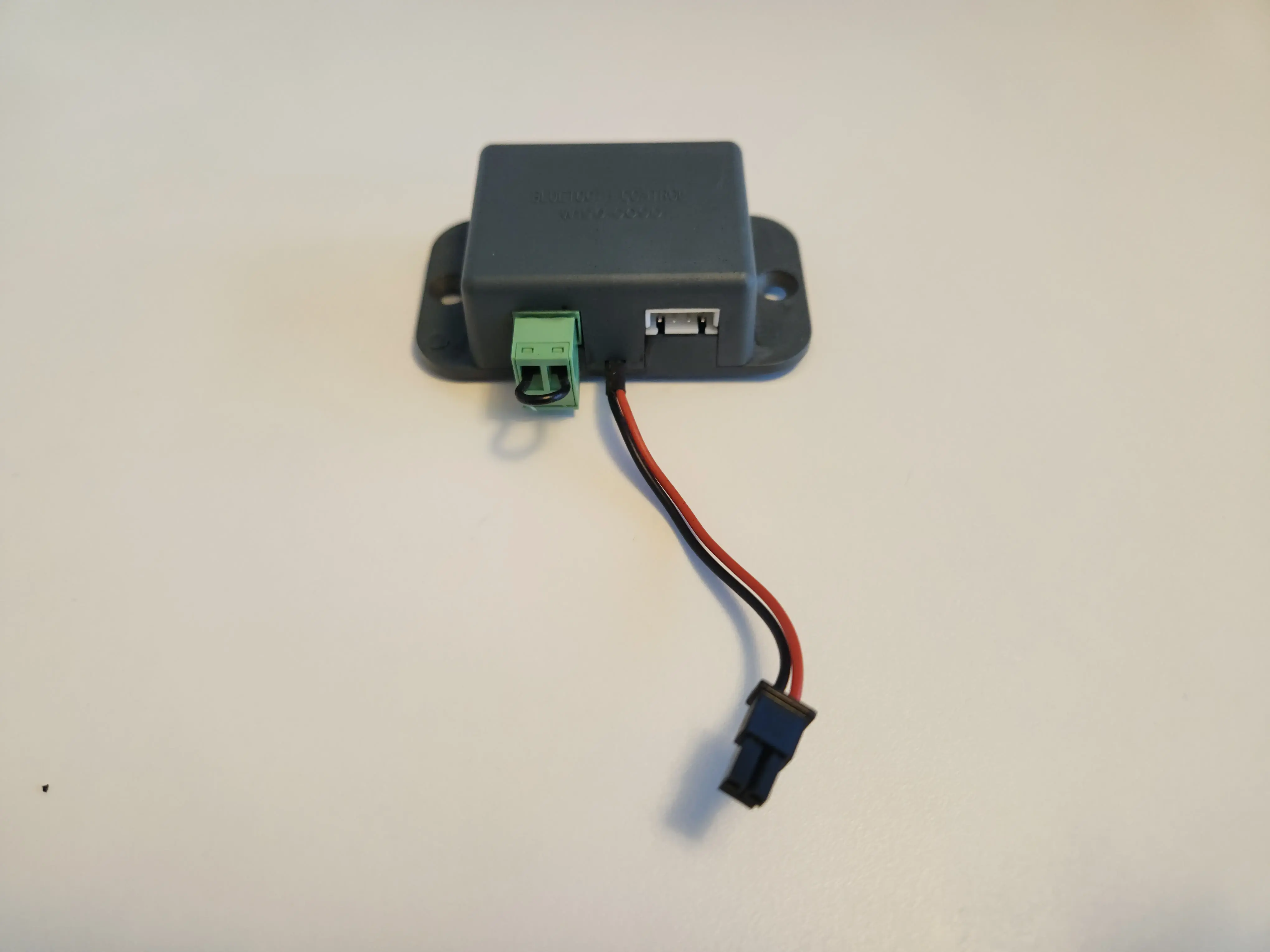
The module has three external connectors:
Green terminal, prepopulated with a jumper cable, referred to in the FCC filing as a “Jumper for user options”
Two conductor lead for the optional LED Controller (Napoleon Model Number W190-0125)
A white 2.54mm pitch 4-pin XH series header for 3.3V power and UART from the SIT ProFlame 2 IFC
The function of the green terminal is currently unknown.
The pinout for the XH header, when viewed in the orientation as seen in the picture above, is as follows:
3V3 | RX | TX | GND
The GND pin is the one that is closest to the edge of the case and has the typical XH Pin 1 marking arrow on the side of the housing of the plug end of the connection.
SIT ProFlame 2 IFC
The SIT ProFlame 2 Integrated Fireplace Control is a controller commonly found in gas fireplaces of various brands.
SIT provides its own Wi-Fi Dongle for the ProFlame 2.
The SIT ProFlame Wi-Fi Dongle User Manual details the hardware requirements for the use of the Wi-Fi dongle. The website also mentions the need to use a ProFlame 2 IFC with the schematics on the case printed in green.
My assumption is the significance of this is the ability of this updated IFC in conjunction with the new “Wi-Fi Enabled” remote (SIT Part 0.584.080) to synchronize state between the remote and Wi-Fi dongle overcoming the limitations the Napoleon implementation currently has.
SIT ProFlame 2 UART Communication
The following information on the ProFlame 2 UART communication has been gathered by sniffing the serial traffic on the port using a little rig I built and the slsnif tool.
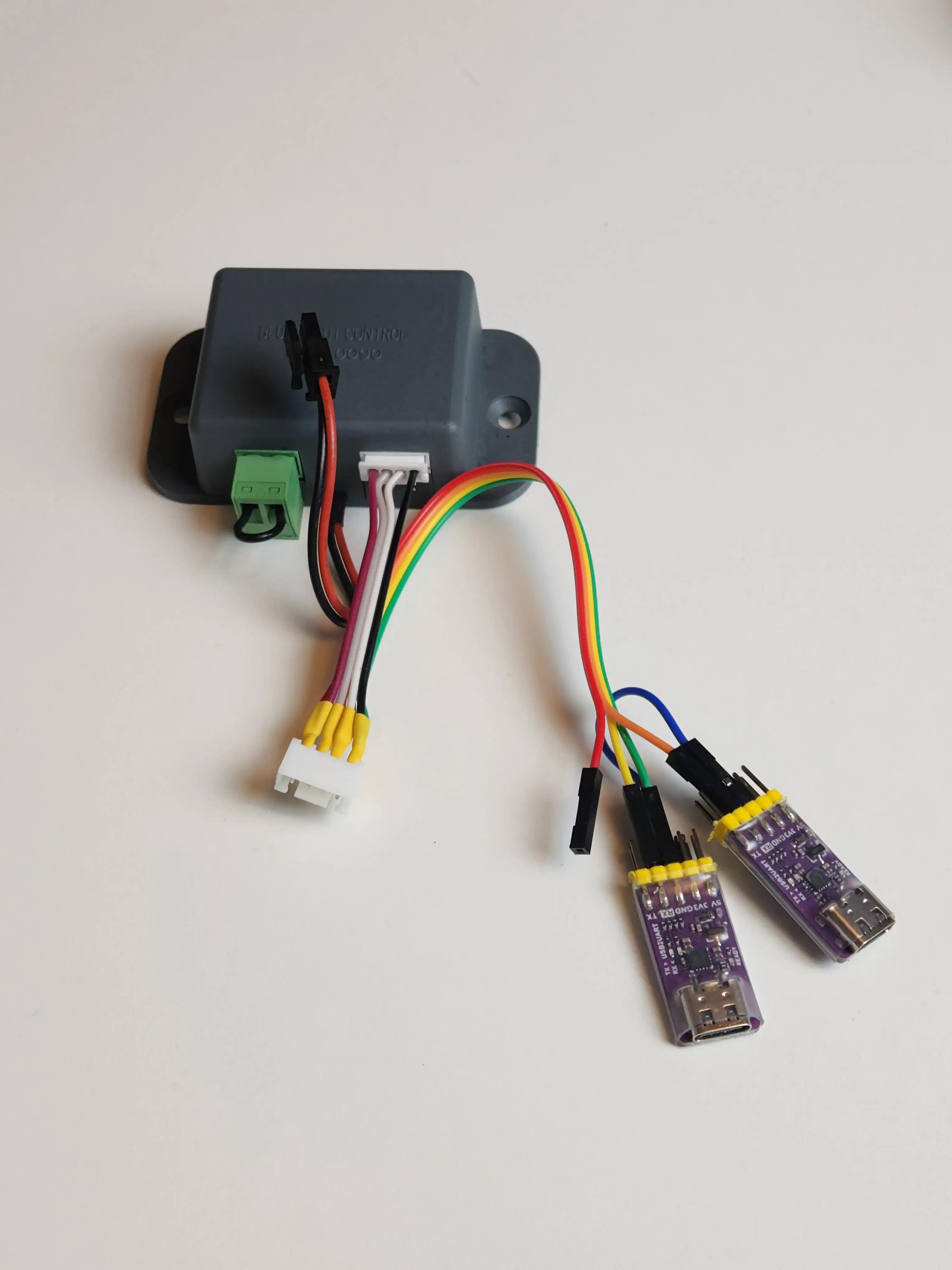
A custom cable breaks out the individual connections to be intercepted by two common USB to serial adapters.
The serial header is found on the bottom right of the IFC and is labelled “Diagnostic Interface X0A”. It uses the same kind of XH connector that is used on the Bluetooth controller.
The GND pin is indicated on the schematic by the single filled dot on the right of the header.
The full pinout is 3V3 | TX | RX | GND and the IFC’s serial parameters are 9600–8-N-1.
The binary protocol seems to use a fixed length of 6 bytes per message. The Napoleon controller polls the IFC every second for state information and sends commands to the IFC as needed.
The IFC does not generate any output unless requested through a message.
Message format
        ---
config:
  packet:
    bitsPerRow: 16

---
packet
   0-7: "Message Type"
   8-31: "Payload"
   32-39: "Register"
   40-47: "Checksum (XOR)"
Message Type
Four message types can be observed:
0x5DSet value request0x5EGet value request0xADSet value response0XAEGet value response
Request messages originate on the controller, and responses originate on the IFC.
Payload
The payload for get requests is 0x00 0x00 0x00.
For set requests, it differs by register. The 0x17 and 0x18
registers directly correlate to their Bluetooth protocol counterparts and use
the same payload format as described below.
Register
What I titled register is what I assume to be an addressing mechanism for certain function groups. The eFIRE controller uses three different registers:
0x16: This seems to relate to requesting control over the fireplace0x17: This directly correlates to the 0x27: IFC CMD1 command in the eFIRE Bluetooth Protocol0x18: This directly correlates to the 0x28: IFC CMD2 command in the eFIRE Bluetooth Protocol
The 0x16 register
The behaviour observed on the 0x16 register suggests it is responsible to broker control over the IFC.
The eFIRE Controller requests control using this message:
0x5D 0xC1 0xA0 0x00 0x16 0x2A
To which the IFC will reply
0xAD 0xC1 0xA0 0x00 0x16 0xDA
if control is granted.
Control is denied if the RF remote is in use. In this case, the IFC will reply
0xAD 0x00 0x00 0x00 0x16 0xBB
The 0x16 register can also be queried using:
0x5E 0x00 0x00 0x00 0x16 0x48
If we have control the IFC will reply
0xAE 0xC1 0xA0 0x00 0x16 0xD9
if we do not have control the IFC will reply:
0xAE 0x00 0x00 0x00 0x16 0xB8
Communication between eFIRE and ProFlame 2
In normal operation the eFIRE Controller requests the current state of both the
0x17 and 0x18 register every second with the following sequence:
CTRL: 0x5E 0x00 0x00 0x00 0x17 0x49
 IFC: 0xAE 0X00 0x61 0x00 0x17 0xD8
CTRL: 0x5E 0x00 0x00 0x00 0x18 0x46
 IFC: 0xAE 0x00 0x00 0x00 0x18 0xB6
In this case, the night light level is set to 6 and the fireplace mode is “on”
in register 0x17, however, since no flame height is set in register 0x18,
the IFC is not operating the burner in this state.
When a setting in either of those registers is changed through the app the controller will issue the following sequence of messages and revert to its polling loop immediately after:
CTRL: 0x5D 0xC1 0xA0 0x00 0x16 0x2A  # requesting control
 IFC: 0xAD 0xC1 0xA0 0x00 0x16 0xDA  # we have control
CTRL: 0x5E 0x00 0x00 0x00 0x16 0x48  # checking control
 IFC: 0xAE 0xC1 0xA0 0x00 0x16 0xD9  # we have control
CTRL: 0x5E 0x00 0x00 0x00 0x17 0x49  # get 0x17 state
 IFC: 0xAE 0X00 0x01 0x00 0x17 0xB8  # 0x17 state
CTRL: 0x5E 0x00 0x00 0x00 0x18 0x46  # get 0x18 state
 IFC: 0xAE 0x00 0x00 0x00 0x18 0xB6  # 0x18 state
CTRL: 0x5D 0x00 0x01 0x00 0x17 0x4B  # set 0x17 state
 IFC: 0xAD 0X00 0x01 0x00 0x17 0xBB  # 0x17 state
CTRL: 0x5D 0x00 0x80 0x00 0x18 0xC5  # set 0x18 state (Split Flow On)
 IFC: 0xAD 0x00 0x80 0x00 0x18 0x35  # 0x18 state
Limitations
The ProFlame 2 IFC currently does not report valid state information when control is taken over using the RF remote control.
Querying the 0x17 and 0x18 registers while the fireplace is controlled by
the RF remote will yield stale values at best and random values at worst.
As soon as the RF remote control is used to control the fireplace we can no
longer gain control using the 0x16 register and the fireplace will respond to
requests for control as outlined above.
Control can only be regained using the 0x16 register when the fireplace is
turned off using the RF remote.
Napoleon mentions this in their documentation by stating that the RF remote always takes precedence over the eFIRE app. Screenshots on the Google Play Store suggest the app is supposed to detect when this happens and block input on the app by showing an overlay. This is not the case with my fireplace.